Base64 encode images: what it really costs you
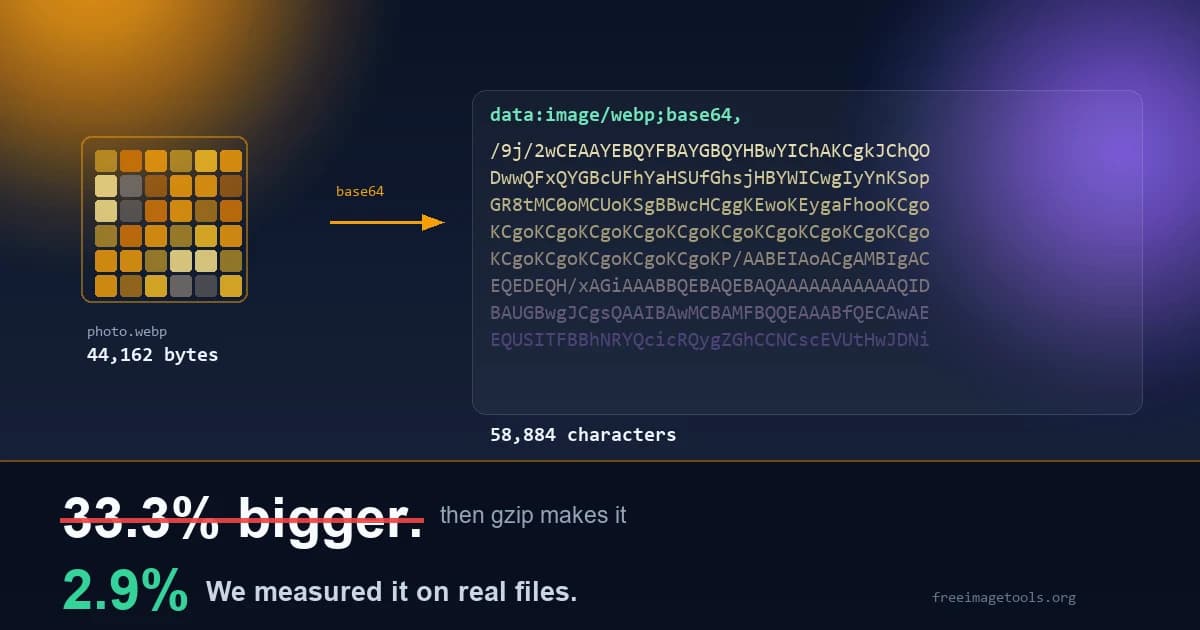
Search for advice about base64 images and you will find the same sentence copied across a hundred blog posts: base64 makes your images 33 percent bigger, so do not use it. The number is correct. The advice built on top of it has been wrong for about a decade.
We took nine real images off this site, encoded every one to base64, then compressed both versions the way any web server compresses what it sends you. The base64 copies came out 33.3 percent larger, exactly as promised. After compression, the gap between them was 2.9 percent.
Not thirty three. Under three.
So the headline objection to base64 images mostly evaporates the moment your server does something it already does by default. Which leaves a better question. If the size penalty is that small, why does inlining images still cause problems? It does cause problems, real ones, and they have almost nothing to do with size. Here is all of it, with the numbers.
What base64 actually is
Computers store images as binary: long runs of bytes that mean nothing as text. HTML, CSS, JSON and email are text formats, and dropping raw binary into a text format breaks things in ugly and unpredictable ways.
Base64 solves that by rewriting the binary using only 64 characters that every text system on earth agrees are safe: A to Z, a to z, 0 to 9, plus, and slash. The output is longer than the input, but it survives being pasted into a stylesheet, an API response or an email body without corrupting anything.
A data URI is that string with a label on the front, so the browser knows what it just received:
data:image/webp;base64,UklGRiQAAABXRUJQVlA4IBgAAAAwAQCdASoBAAEA...
The browser reads the prefix, decodes the rest, and renders an image. No network request, because the image was already in the document.
That is the whole idea. Everything else in this article is about whether you should do it.
How the encoding actually works
Worth seeing once, because it explains every quirk in this article. Take three bytes, the letters Img in ASCII:
I = 73  = 01001001
m = 109 = 01101101
g = 103 = 01100111
Line those up as one run of 24 bits, then split them into four groups of six instead of three groups of eight:
010010010110110101100111     24 bits
010010 010110 110101 100111  four 6-bit groups
    18     22     53     39  their values
Now look each value up in the base64 alphabet, where A to Z is 0 to 25, a to z is 26 to 51, 0 to 9 is 52 to 61, plus is 62 and slash is 63. You get S, W, 1, n. The three byte word Img has become the four character string SW1n.
That six bit grouping is the entire story. Every output character carries six bits of real information but occupies a full eight bit byte once it is stored as text, so two bits in every single character are structurally wasted. Those wasted bits are where the 33 percent comes from, and they are also precisely what gzip finds and takes back later. The inflation and the recovery are the same fact viewed from two directions.
When the input does not divide neatly by three, base64 pads. One leftover byte produces two characters followed by ==. Two leftover bytes produce three characters followed by =. That is why a valid base64 string always has a length divisible by four, and why deleting the padding to tidy it up breaks decoding completely.
The exact size math
Base64 works in fixed groups. It takes three bytes of input and produces four characters of output, every single time. Three into four is where the famous 33 percent comes from, and the formula is exact:
output length = 4 x ceil(input bytes / 3) characters
Look at the small files. A 100 byte file grows by 36 percent, not 33. The ratio only settles down to 1.333 once the file is big enough for the rounding to stop mattering. Base64 pads the last group with = characters so the output length is always divisible by four, and on tiny inputs that padding is a real slice of the total.
Then there is the prefix, which almost nobody bothers to count:
Twenty something characters is nothing on a photo. On a 200 byte icon it is 11 percent of the original file before a single pixel has been encoded, which pushes the total inflation to 45 percent rather than 33. Small files pay the worst overhead in relative terms, and small files are exactly the ones people most often decide to inline. Worth knowing before you assume the 33 percent figure applies to your case.
What gzip does to that 33 percent
This is the part that does not get published anywhere, so we measured it ourselves on the actual images this site serves.
Every one of those files is already compressed. WebP, JPEG and PNG all compress internally, which means the bytes inside them look close to random, and random data does not compress twice. Common sense says gzip should be able to do nothing here.
Except gzip is not compressing the image. It is compressing the base64 text, and base64 text is extremely repetitive by construction. It draws from an alphabet of 64 symbols, so every character it writes wastes two of the eight bits it occupies. Gzip finds that structural waste and takes most of it back.
The result on real files, all nine of them from this site's own public folder:
The short version: raw inflation is 33.3 percent. Delivered inflation, with compression switched on, is 2.9 percent. If the only argument you have ever heard against inlining images is the 33 percent number, you have been arguing about the wrong thing.
That does not make base64 free. Three percent of a large page is still bytes, and the costs in the next section have nothing to do with file size at all. But it does mean the size objection deserves to be retired, or at the very least demoted.
One caveat that genuinely matters: this holds when compression is on. It is on by default for HTML and CSS on every mainstream host and CDN. If you have somehow turned it off, the full 33 percent lands on your users, and honestly you have a bigger problem than base64.
So what is the real problem
Four things, and the first one should always lead.
1. You just threw away caching
A normal image is a separate file with its own URL. The browser downloads it once, stores it, and reuses it on every page for as long as your cache headers allow, which for a static asset should be about a year. The second page view costs nothing at all.
An inlined image has no URL. It is text sitting inside the document. If that document is HTML, it comes down again on every single page load, because HTML is normally not cached. Put your logo in the header as a data URI and a visitor who reads five pages has downloaded that logo five separate times.
Now compare that to the 2.9 percent from earlier. The transfer cost of encoding is tiny. The transfer cost of losing caching is the entire file, over and over. That is the trade you are actually making, and it is the one nobody mentions.
CSS is a little better, because stylesheets do get cached. But then changing any single inlined image invalidates the whole stylesheet, and every visitor re downloads every icon in it just to receive one new one.
2. It blocks rendering instead of running alongside it
A regular img tag is an independent download. The browser spots it, fires off a request, and carries on parsing and painting while it arrives. The image appears when it is ready and nothing waits for it.
Inline that same image in CSS and it becomes part of a render blocking resource. Nothing paints until the stylesheet has downloaded and parsed, and the stylesheet is now carrying an image inside it. Inline it in HTML instead and the parser has to chew through tens of thousands of characters before it reaches whatever comes next.
You swapped a cheap parallel request for an expensive serial one. On a fast laptop connection you will never notice. On a phone with two bars it is precisely the wrong trade, and it shows up in your Core Web Vitals as a slower Largest Contentful Paint.
3. You lose every modern image feature at once
A data URI cannot do any of this:
- loading="lazy", so offscreen images download immediately whether the visitor scrolls or not
- srcset and sizes, so a phone receives exactly the same pixels as a 5K monitor
- The picture element, so no serving AVIF to browsers that support it and JPEG to those that do not
- CDN resizing and format negotiation, because there is no URL for the CDN to work with
- Priority hints, decoding="async", and per asset cache control
Ten years of image tooling, all of it built on the idea that an image is a file with an address. Inline it and you opt out of the lot. If you are weighing formats at the same time, our guide on which image format to use pairs well with this one.
4. The reason inlining existed has expired
The original case for inlining was HTTP/1.1. Browsers held roughly six connections per host, so every extra file queued behind the others, and cutting the number of requests was worth real money. Inlining small assets made complete sense.
HTTP/2 arrived in 2015 and multiplexes: many files travel over a single connection at the same time. HTTP/3 improved on it again. The per request cost that justified inlining is now small enough that trading away caching to avoid it is usually a losing move.
Most of the base64 advice floating around was written before that change and has been copied forward ever since, which is how a tip that made sense in 2013 became a rule that quietly hurts sites in 2026.
And your HTML gets genuinely enormous
Not a performance killer on its own, but it makes everything harder to live with:
That is parse time, memory, and a document nobody can read. Every diff becomes unreviewable, view source is useless, and if your CMS keeps post content in a database then all of it goes in the database too.
When you actually should inline
None of the above means never. It means the sweet spot is a lot narrower than people assume.
The rule of thumb, if you want one sentence: under about 2 KB and needed for the first paint, inline it. Above about 4 KB, do not. Between the two, measure, and lean towards not.
Where base64 images genuinely shine
Web pages are the case everybody argues about, and for web pages the answer is usually no. But base64 exists for good reasons, and there are places where it is clearly the right call rather than a tolerated compromise.
Single file deliverables
An HTML report, an invoice, a dashboard export that has to survive being emailed around or opened from a USB stick with no folder of assets sitting next to it. Every image has to live inside the document or the document is broken. Base64 is the only option, and it is a good one.
Offline storage and PWAs
localStorage and IndexedDB store strings, not files. If you are caching a user avatar or a generated image so your app still works with no connection, a data URI drops straight in and comes straight back out.
API payloads
JSON has no concept of binary. When an endpoint needs to return a thumbnail alongside its metadata in a single response, base64 is the standard answer and has been for twenty years.
Anything generated in the browser
canvas.toDataURL() hands you base64 by definition. A QR code, a chart, a cropped avatar, a screenshot: all of it starts life as a data URI before you decide whether to display it, download it or upload it somewhere.
Notebooks and portable markdown
Jupyter embeds plot output as base64 so the notebook renders correctly on any machine that opens it. Markdown files that need to travel alone do the same thing.
Notice the pattern running through all five. Base64 wins whenever the image has to be inside something else, and loses whenever the image could simply be its own file. That single sentence is a better decision rule than any size threshold.
The SVG trick almost nobody uses
If you are inlining an SVG, base64 is the wrong tool and it is costing you real bytes.
Base64 exists to make binary safe inside text. SVG is already text. Encoding text into a text safe alphabet is pure waste. The better option is percent encoding, which only escapes the handful of characters that would genuinely break a CSS url().
Measured on the SVG files sitting in this site's public folder:
Between 9 and 23 percent smaller, and the result stays readable inside your stylesheet, which means you can change a fill colour without decoding anything first. There is no downside. If you are base64 encoding SVG today, switch.
/* wasteful */
background: url("data:image/svg+xml;base64,PHN2ZyB4bWxucz0iaHR0cDovL3d3...");

/* smaller, and you can still read it */
background: url("data:image/svg+xml,%3Csvg xmlns='http://www.w3.org/2000/svg' viewBox='0 0 24 24' fill='%23f59e0b'%3E%3Cpath d='M12 2L2 7l10 5 10-5z'/%3E%3C/svg%3E");
Two gotchas with percent encoding: use single quotes inside the SVG so they do not fight with the CSS quotes, and encode # as %23 or the browser treats everything after it as a fragment identifier and your icon quietly vanishes.
How to actually do it
Once you have the string, and our image to base64 encoder will give you one without uploading anything anywhere, there are three places it goes.
In HTML
<img src="data:image/webp;base64,UklGRiQAAABXRUJQVlA4..." alt="Logo" width="24" height="24">
In CSS
.icon-check {
  background-image: url("data:image/png;base64,iVBORw0KGgoAAAANSUhEUg...");
  background-size: 16px 16px;
}
In JavaScript
Reading a file the visitor picked and turning it straight into a data URI, no server involved:
const reader = new FileReader();
reader.onload = () => {
  document.querySelector("img").src = reader.result; // already a data URI
};
reader.readAsDataURL(file);
Going the other way, turning a data URI back into a real file you can upload:
const res  = await fetch(dataUri);
const blob = await res.blob();
const file = new File([blob], "image.png", { type: blob.type });
And if you are working with a build tool, stop doing this by hand. Vite, webpack and Next all inline assets below a size threshold automatically. Set the threshold to around 2 KB and let the bundler make the decision every time instead of you.
Things that break, and why
Missing padding
The = or == on the end is not decoration. Base64 output has to be divisible by four and the padding is how that happens. Strip it because it looks untidy and the string fails to decode. This is the single most common cause of a base64 image that refuses to render.
The MIME type does not match the file
Label a JPEG as image/png and browsers will often sniff the real type and display it anyway, which is worse than failing outright, because it works on your machine and then breaks in an email client, a PDF generator, or any image library that trusts what you told it. Set the type correctly.
Content Security Policy blocks it
If your site sends a CSP header, data URIs are blocked unless you allow them explicitly. The image simply does not appear and your only clue is a console warning:
Content-Security-Policy: img-src 'self' data:;
The string got truncated
Base64 strings for real images run to tens of thousands of characters. Editors wrap them, terminals clip them, chat apps helpfully shorten them, and spreadsheet cells have hard length limits. A truncated string looks completely fine and decodes to nothing. If an image mysteriously stopped working right after you moved the string somewhere, check the length before you check anything else.
Email clients refuse it
Support for data URI images in email is poor and inconsistent, and several major clients block them outright, so the image silently fails for a large share of your list. Host the file and use a normal absolute URL. If you are sizing images for a campaign, we covered that properly in the best image size for email.
One thing base64 is definitely not
Base64 is not encryption. It is not obfuscation, it is not security, and it hides nothing from anyone.
The alphabet is public and the transformation is trivially reversible. Anyone can paste your string into a browser console, or any decoder on the internet, and read what is inside in about two seconds. People still base64 encode API keys, passwords and private config and genuinely believe they have protected something. They have not. They have made it marginally less readable to a human being and no less readable to anything else.
Encoding changes the format. Encryption changes who can read it. The two are not related.
The honest summary
The 33 percent figure everyone quotes is real, and it is also almost entirely undone by compression you already have switched on. On real files the delivered cost was 2.9 percent. So stop leading with size.
Lead with caching, because that is the cost that actually hurts. An inlined image is downloaded again on every page load, forever, while a normal file is downloaded once and reused for a year. That is the argument, and it is the reason base64 belongs on tiny critical path assets and almost nothing else.
Under 2 KB and needed immediately, inline it and get on with your day. Anything bigger, or anything appearing on more than one page, give it a URL and let the browser do the thing it has always been good at.
Need a base64 string right now?
Our encoder runs entirely in your browser, so the image never reaches a server. Drop a file and copy the data URI, or paste a base64 string to decode it back into a viewable image.