Can you unblur a photo? We blurred 12 photos and tried to undo it
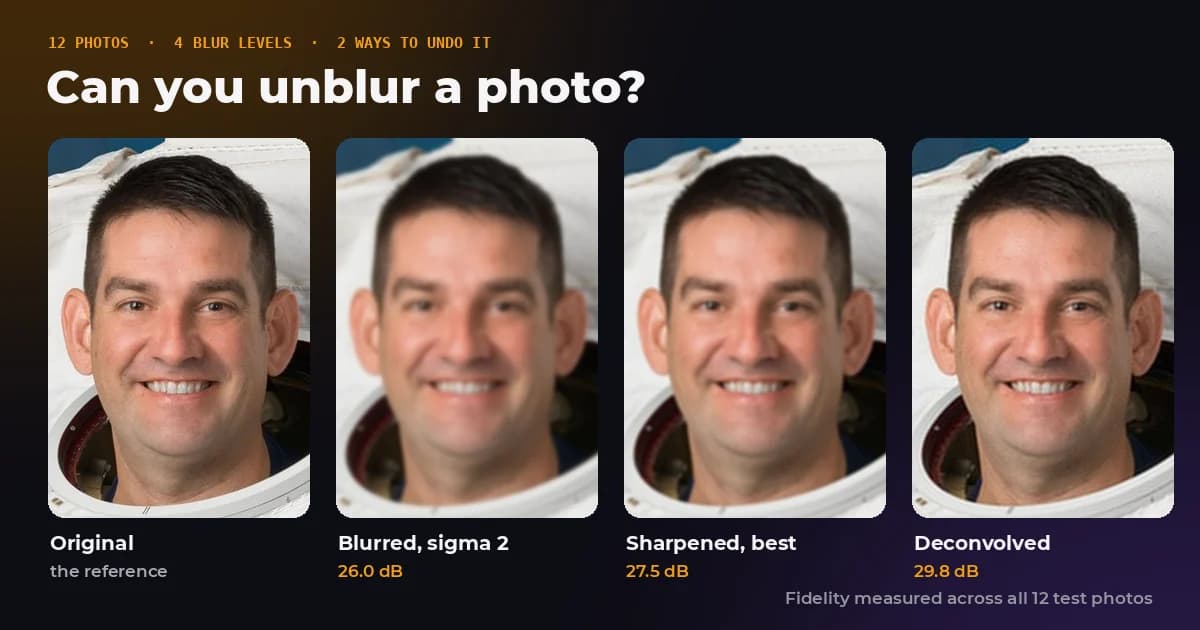
Every photo editor has a sharpen slider, and every phone gallery now seems to offer an unblur button. So we ran the test nobody publishes: we took 12 sharp photographs, blurred them by known amounts, and measured how much of the damage each method could actually take back.
The short version is that a photo which is only slightly soft can be rescued almost completely. A photo that is properly blurred cannot, and sharpening a motion blurred photo makes it worse at every strength we tried. The numbers are below, along with what to do instead.
- Can a slightly soft photo be fixed?
- Mostly, yes. Gentle sharpening removed 84.8 percent of the error from our lightest blur.
- Can a heavily blurred photo be fixed?
- No. The best sharpening removed 5.2 percent of the error from our heaviest blur.
- What about motion blur?
- Sharpening never helped. Only deconvolution with the exact motion known did, and a JPEG save cut that in half.
- Do AI unblur apps recover the detail?
- They generate new detail that looks right. It is a guess, not the original.
How we tested it
We used 12 public domain photographs from NASA's image library, all resized to 1,200 pixels wide: an astronaut portrait, a Curiosity rover self portrait, Apollo photos, Hubble and Webb images, and Earth seen from the space station. A mix of faces, fine texture, stars and smooth gradients.
Each photo was blurred with a Gaussian blur at four strengths, measured as the blur radius (sigma) in pixels: 0.5, 1, 2 and 4. On a 1,200 pixel photo, 0.5 is barely visible, 1 looks like a slightly missed focus, 2 is clearly soft, and 4 wipes out small details such as eyelashes and fine text. We also added a 9 pixel horizontal motion blur, the kind a moving hand or subject produces.
Then we tried to undo each blur in two ways. First with the exact sharpening kernel our own Sharpen tool uses, at every strength from 10 to 200 percent, keeping the best result. Second with Wiener deconvolution given the exact blur that was applied, which is the best case for any unblurring method, because in real life nobody tells you the blur.
Every result was compared with the original sharp photo. We report fidelity in decibels across all 12 photos, and the share of the blur's error that each method took away. Above about 40 dB two images are hard to tell apart. Below about 30 dB the damage is obvious.
The results
| Blur applied | Blurred photo | Sharpen, best strength | Deconvolution, blur known |
|---|---|---|---|
| Gaussian, sigma 0.5 px | 38.64 dB | 46.82 dB, 84.8% removed (at 10%) | 53.38 dB, 96.6% removed |
| Gaussian, sigma 1 px | 29.80 dB | 34.53 dB, 66.4% removed (at 100%) | 37.25 dB, 82.0% removed |
| Gaussian, sigma 2 px | 26.03 dB | 27.53 dB, 29.2% removed (at 200%) | 29.83 dB, 58.3% removed |
| Gaussian, sigma 4 px | 23.76 dB | 23.99 dB, 5.2% removed (at 200%) | 26.18 dB, 42.8% removed |
| Motion, 9 px | 26.22 dB | No strength helped | 34.66 dB, 85.6% removed |
Read down the middle column and the pattern is plain. The more a photo is blurred, the less sharpening can do, and the drop is steep. A blur of 1 pixel gave up two thirds of its damage. A blur of 4 pixels gave up one twentieth, even with the slider at its maximum.
The right column is the ceiling. Even knowing the blur perfectly, the best mathematical reversal lost ground at every step: 97 percent recovered at the lightest blur, 43 percent at the heaviest. Blur does not just hide fine detail, it pushes it below the rounding of the 8 bit pixel values, and once it is there no method can pull it back.
Why sharpening is not the same as unblurring
A blur spreads each point of light into its neighbours. Undoing it properly means gathering that light back, which requires knowing exactly how it was spread. Sharpening does something simpler: it finds edges and makes them more extreme, by adding a little of the difference between each pixel and its surroundings.
On a photo that is only slightly soft, that simple trick is close enough to the real answer, which is why the lightest blur recovered so well. On a heavy blur, there are no crisp edges left to exaggerate. The slider mostly amplifies noise and the blocky patterns JPEG leaves behind, and adds bright and dark halos along every outline.
On our lightest blur, sharpening at 10 percent removed 84.8 percent of the error, but the default 50 percent made the photo worse than the blurred version, with 4.5 times more error. If a photo is only a little soft, start low and compare before you download.
Motion blur is a different problem
Motion blur smears every point along a line instead of spreading it in a circle. Sharpening pushes equally in every direction, so it cannot undo a smear that went one way. In our test, every sharpening strength from 10 to 200 percent left the motion blurred photos slightly worse than before.
Deconvolution that knew the exact direction and length of the motion removed 85.6 percent of the error, which shows the information is not entirely lost. The catch is that you have to know or estimate that motion precisely, and the next section shows what happens once the photo has been saved as a JPEG.
What a JPEG save does to your chances
Real blurry photos are almost never raw pixels. They come off a phone as JPEG or HEIC files, which have already thrown away fine detail and added their own noise. We repeated the test after saving each blurred photo at JPEG quality 85.
| Blur applied | Sharpen, best | Deconvolution, raw pixels | Deconvolution, after JPEG 85 |
|---|---|---|---|
| Gaussian, sigma 1 px | 35.0% removed (at 70%) | 82.0% removed | 42.6% removed |
| Gaussian, sigma 2 px | 14.8% removed (at 170%) | 58.3% removed | 39.2% removed |
| Motion, 9 px | No strength helped | 85.6% removed | 55.8% removed |
Compression roughly halved what the ideal method could recover, and cut sharpening's gains on the clearly soft photo from 29 to 15 percent. The noise a JPEG adds is exactly what deconvolution amplifies, so the reversal has to be held back to avoid a grainy mess.
What AI unblur apps actually do
Several phone gallery apps and AI photo editors now offer a one tap unblur. They do not reverse the blur the way deconvolution tries to. They are trained on large collections of sharp and blurred images, learn what sharp detail usually looks like, and then draw that detail into your photo.
The results can look genuinely sharp, which is the point, and for a snapshot you just want to enjoy that may be fine. But the new detail is a prediction. Eyelashes, skin texture and brickwork are invented to look plausible, text can come back as different letters, and a face can drift slightly away from the person in it. For anything that has to be accurate, such as evidence, documents or a photo of a number plate, treat an AI unblurred image as an illustration, not a record.
What to do with a blurry photo
If it is only a little soft
Sharpen gently. On our Sharpen tool, start around 10 to 20 percent and drag the comparison across a face or an edge before you save. If a photo looks soft only when you zoom to 100 percent, resizing it down for sharing often fixes the impression on its own, because each output pixel averages several softer ones. Sharpen after resizing, not before.
If it is clearly blurred
A sharpen slider will not rescue it. Deconvolution software that estimates the blur can recover part of the detail, with the limits the table above shows. If the photo matters and can be taken again, retaking it will beat any repair.
If it is motion blur
Do not reach for sharpening, which our test showed only adds damage. Use a tool built for motion deblurring, or accept the photo as it is. Next time, a faster shutter speed prevents it: a common rule of thumb for hand held shots is a shutter at least as fast as one over the focal length, such as 1/50 of a second on a 50 mm lens.
If you need a bigger version
Enlarging and unblurring are separate problems. Our guide to upscaling images covers what works when a photo is simply too small.
Try it on your own photo
The Sharpen tool runs in your browser, so the photo never leaves your device. Set the strength, apply, and drag the divider to compare with the original before you download.
The bottom line
You can unblur a photo only when there is very little blur to undo. A barely soft picture came back to within a whisker of the original. A clearly blurred one kept most of its damage no matter what we did, and motion blur did not respond to sharpening at all. The detail a blur destroys is gone, and anything that shows it again is either mathematics working at the edge of the noise or an AI drawing its best guess.
Frequently asked questions
Sources and method
Test set: 12 public domain NASA photographs, resized to 1,200 pixels wide. Blurs: Gaussian with sigma 0.5, 1, 2 and 4 pixels, and a 9 pixel horizontal box motion blur, each optionally followed by a JPEG save at quality 85. Restorations: the FreeImageTools Sharpen kernel (centre 1 + 4a, four neighbours minus a) at strengths from 10 to 200 percent, best result reported, and Wiener deconvolution with the exact blur kernel and a tuned noise constant. Scores are pooled PSNR across all 12 photos against the sharp originals. Error removed is the share of the blurred image's total squared error that the restoration removed.
- NASA Image and Video Library, source of the 12 test photographs
- Wiener deconvolution, Wikipedia
- Unsharp masking, Wikipedia
- Point spread function, Wikipedia
- Peak signal to noise ratio, Wikipedia
In a test on 12 photographs, sharpening removed 84.8 percent of the error from a slight blur but only 5.2 percent from a heavy one, and no sharpening strength improved motion blur. FreeImageTools, "Can You Unblur a Photo? We Tested 12 Blurred Photos", September 27, 2026, https://freeimagetools.org/blog/can-you-unblur-a-photo