How to make a photo an exact KB size for upload forms
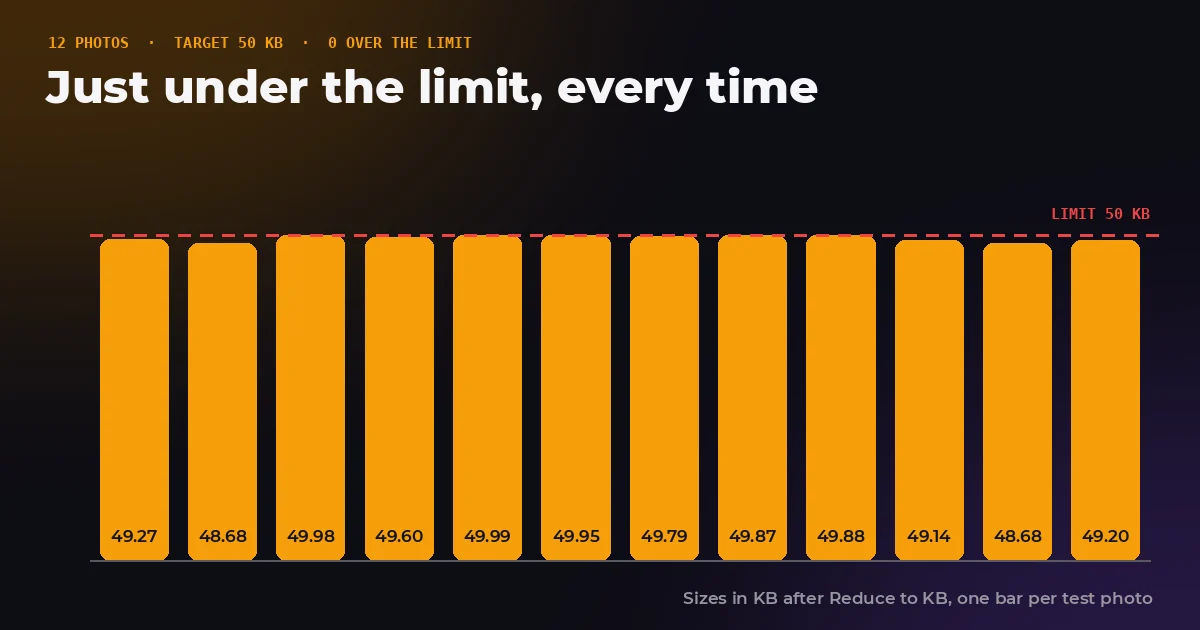
Visa portals, exam boards and job sites all ask for a photo under a certain number of kilobytes, and they reject a file that is one kilobyte over without saying much else. Some also reject files that are too small. We checked the official limits for the forms people fight with most, then ran our Reduce to KB tool 48 times on 12 photos to see how close to a limit a photo can really get.
- Can I make a photo exactly 50 KB?
- Not exactly. JPEG sizes jump between settings, so the goal is just under. Our tool landed between 97.4 and 100 percent of a 50 KB target.
- Does the form count 1,000 or 1,024 bytes?
- Portals rarely say. A file under the limit in 1,000 byte kilobytes is under it either way.
- Why won't my photo go under 20 KB?
- It needs fewer pixels. All 12 of our photos had to be resized to reach 20 KB at a readable quality.
- Can a photo be too small?
- Yes. UK passport photos must be at least 50 KB, US passport renewal photos at least 54 KB and India e-Visa photos at least 10 KB.
The official limits
These are the photo rules published by each government for online applications, checked on the official pages in September 2026. Limits change, so treat the portal's own instructions as the final word before you upload.
| Application | File type | File size | Pixel size |
|---|---|---|---|
| UK passport, digital photo | Digital photo | 50 KB to 10 MB | At least 600 × 750 |
| UK visa or permission | JPEG | 50 KB to 6 MB | At least 600 × 750 |
| US passport renewal online | JPG, JPEG, PNG, HEIC or HEIF | 54 KB to 10 MB | Not stated on the page |
| US visa (DS-160) and DV lottery | JPEG | 240 kB or less | Square, 600 × 600 to 1200 × 1200 |
| Canada citizenship grant online | JPG or JPEG | About 240 kB, 4 MB at most | At least 420 × 540 |
| India e-Visa, photo | JPEG | 10 KB to 1 MB | Square |
| India e-Visa, passport page scan | 10 KB to 300 KB | Not applicable |
Two things stand out. The limits are not only maximums: three of these forms reject files that are too small. And the US visa limit is tight enough that a normal phone photo, often 2 to 5 MB, has to shrink by roughly 90 percent or more to fit.
Why an exact KB size is impossible
A JPEG's size is not a dial you can set. It falls out of the quality setting and the content of the photo, and it moves in jumps. Here is one photo, an astronaut portrait at 1,200 × 1,501 pixels, saved from the same browser engine our tool uses:
| JPEG quality | File size |
|---|---|
| 50 | 129,602 bytes |
| 60 | 149,409 bytes |
| 70 | 181,085 bytes |
| 80 | 234,558 bytes |
| 85 | 274,214 bytes |
| 90 | 375,031 bytes |
| 95 | 498,103 bytes |
Between quality 85 and 90 the file grew by more than 100 KB. If a form wants 300 KB, neither setting is close. That is why a good reducer does not pick from a list of qualities. Ours tries fractional values in between, halving the gap each time, and stops as soon as a result is under the limit and within 3 percent of it.
KB or KiB: the 24 byte trap
A kilobyte is officially 1,000 bytes, but for decades computers also used KB for 1,024 bytes, now properly called a kibibyte, KiB. Windows still shows file sizes in 1,024 byte units while labelling them KB. Upload forms almost never say which one they mean.
For a maximum, that ambiguity has an easy way out. A file under 50,000 bytes is under 50 KB whichever definition the portal uses, since 50 KiB is the bigger number. That is why our tool counts 1 KB as 1,000 bytes.
For a minimum it works the other way round. A UK passport photo must be at least 50 KB. If the portal counts in KiB, that is 51,200 bytes, and a 50,500 byte file could be refused. Aiming for 60 to 100 KB keeps you clear of both the minimum and the maximum.
What happened when we ran 48 reductions
We ran the Reduce to KB algorithm, in the same browser engine a visitor would use, on 12 public domain NASA photos at 1,200 pixels wide. Each photo was reduced to four targets: 20, 50, 100 and 240 KB.
| Target | Over the limit | Share of limit used | Photos resized | Quality used |
|---|---|---|---|---|
| 20 KB | 0 of 12 | 98.6% average (97.0 to 100%) | 12 of 12 | 0.50 to 0.66 |
| 50 KB | 0 of 12 | 99.0% average (97.4 to 100%) | 9 of 12 | 0.51 to 0.75 |
| 100 KB | 0 of 12 | 97.8% average (95.3 to 100%) | 7 of 12 | 0.52 to 0.90 |
| 240 KB | 0 of 12 | 91.1% average (51.2 to 99.2%) | 2 of 12 | 0.58 to 0.95 |
No result went over its limit, which is the thing that matters for a form. At 20 KB every photo had to be made smaller in pixels, with final widths between 276 and 1,007 pixels, because no JPEG quality setting could squeeze a full 1,200 pixel photo that far while staying readable. The tool prefers shrinking the dimensions to crushing the quality below 0.5, where faces start to break into blocks.
The 240 KB row has a low minimum of 51.2 percent for a good reason. Three photos were already under 240 KB at quality 0.95, the highest setting the tool uses, so it stopped there rather than inflating the file. The Apollo 8 Earthrise photo came out at 122.8 KB. Nothing is gained by padding a photo up to a limit.
At 20 KB, some of our photos ended up narrower than 600 pixels. A form that needs at least 600 × 750 pixels and also a tiny file size forces a trade off. Crop tightly to head and shoulders first, so the pixels you keep are the ones that matter.
How to get a photo under a KB limit
- Crop to what the form wants. For an ID photo, use the Passport Photo tool to get the right ratio and head size.
- Resize to the pixel size required. If the form asks for 600 × 600, do not upload 3,000 × 3,000. Fewer pixels leave more of the budget for quality.
- Convert if needed. An iPhone HEIC file will be refused by forms that want JPEG. Convert it with HEIC to JPG first.
- Set the limit in Reduce to KB. Type the number the form gives. The result will be just under it, never over.
- Check the minimums. Make sure the file is above any minimum size and still meets the pixel size, then upload.
Mistakes that get photos rejected
- Renaming instead of converting. Changing photo.png to photo.jpg does not make it a JPEG, and many portals check the actual contents.
- Upscaling to meet a pixel minimum. Blowing a small photo up adds pixels but no detail, and the extra pixels eat into the KB budget.
- Compressing a screenshot of a photo. A screenshot adds screen scaling and sometimes interface elements. Use the original file.
- Stripping too much. Some ID photo rules forbid edits beyond cropping and resizing. Do not retouch or filter an official photo.
Hit a KB limit in one step
Type the limit, drop the photo, download a JPEG that is just under it. Everything happens in your browser, so the photo of your face never reaches a server.
The bottom line
You cannot make a photo exactly 50 KB, and you do not need to. What a form needs is a file under its maximum, over its minimum and at the right pixel size. Crop and resize first, then let a reducer find the highest quality that fits. In our 48 runs that landed within a few percent of every limit and never once over it.
Frequently asked questions
Sources and method
Official limits were read from each government's own page in September 2026, linked below. The reduction test ran the Reduce to KB algorithm in headless Chrome, the same encoder Chrome visitors use, on 12 public domain NASA photographs at 1,200 pixels wide, with targets of 20, 50, 100 and 240 KB counted as 1,000 byte kilobytes. The quality table uses the same browser encoder on one portrait photo.
- GOV.UK, Get a passport photo: digital photos
- GOV.UK, Take a photo of your face for a visa application or permission
- U.S. Department of State, uploading a digital photo for online passport renewal
- U.S. Department of State, visa photo requirements
- Government of Canada, citizenship grant online photo specifications
- Government of India, e-Visa application portal
- NIST, prefixes for binary multiples (KiB and KB)
Across 48 reductions of 12 photos to 20, 50, 100 and 240 KB, the FreeImageTools Reduce to KB algorithm never exceeded the limit and used 99.0 percent of a 50 KB limit on average. FreeImageTools, "Make a Photo an Exact KB Size for Upload Forms", September 27, 2026, https://freeimagetools.org/blog/exact-kb-photo-size