How to make a GIF, and what we learned making 18 of them from one clip
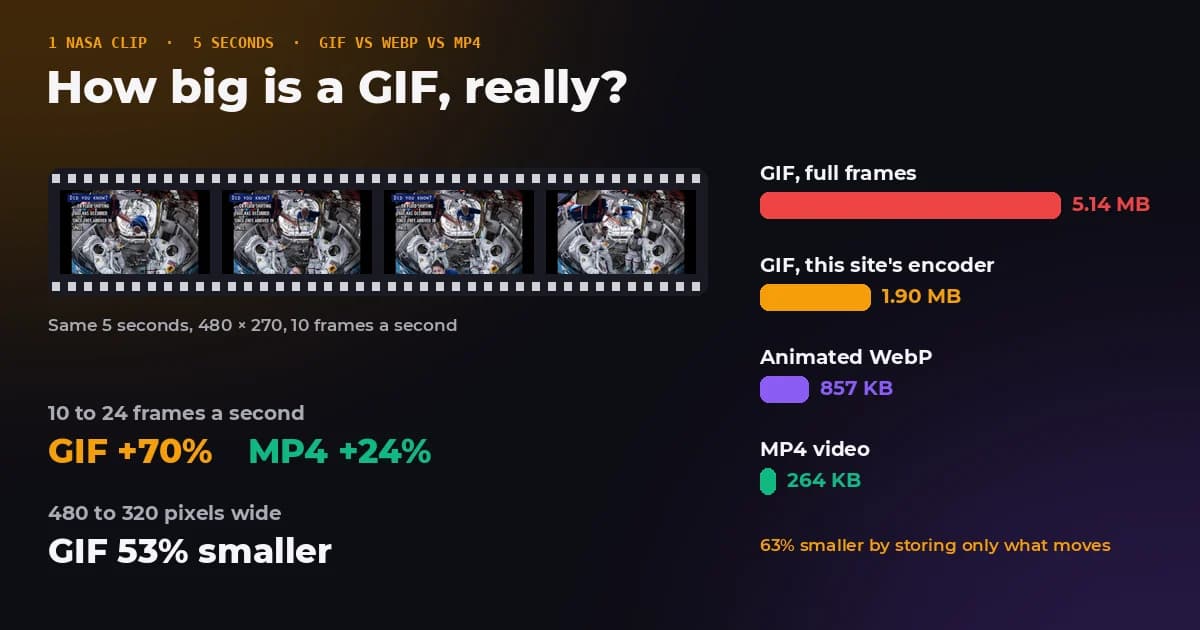
Making a GIF takes a minute. Making one that is not ten megabytes takes knowing which setting actually matters. So we took a single 5 second clip, made 18 GIFs from it while changing one thing at a time, and saved the same clip as an animated WebP and an MP4 to see what the 1980s format really costs.
The answer is that width and frame rate decide almost everything, colours matter much less than people think, and the way a GIF is written can make it a third of the size without changing how it looks.
- How do I make a GIF?
- Add photos or a short video to a GIF maker, set the time per frame and the width, and export. Our GIF maker does it in the browser.
- What size should it be?
- 480 pixels wide at 10 frames per second suits most clips. Our 5 second test came out at 1.90 MB.
- What makes a GIF big?
- Width and frame count. Colours and dithering change the size by a few percent to a third.
- Is MP4 better?
- Much smaller, 7.4 times in our test. Use GIF only where video will not play or autoplay.
How we tested it
The clip is 5 seconds from NASA's public domain video Suiting Up for a Spacewalk (Johnson Space Center, 2019), starting at 0:14. It is a fixed camera inside the space station with astronauts moving around two spacesuits and captions changing on screen, which is typical of the clips people turn into GIFs: some movement, a lot of still background, some text.
Every GIF was made with the encoder our GIF maker uses, run in Node.js on the exact frames ffmpeg extracted, so the numbers are what the tool produces. For comparison, ffmpeg 6.1 saved the same frames as an animated WebP (libwebp, quality 75) and an MP4 (x264, CRF 23). We changed one setting at a time from a baseline of 480 pixels wide, 10 frames per second and 256 colours with dithering.
Width matters most
| Width | GIF | Animated WebP | MP4 |
|---|---|---|---|
| 320 × 180 | 919 KB | 478 KB | 139 KB |
| 480 × 270 | 1.90 MB | 857 KB | 264 KB |
| 640 × 360 | 3.22 MB | 1.16 MB | 409 KB |
| 800 × 450 | 4.90 MB | 1.65 MB | 583 KB |
A GIF grows with the area of the picture. 640 pixels wide has 78 percent more pixels than 480, and the GIF grew 70 percent. Going down to 320 pixels cut it by more than half. Most places a GIF ends up, a chat, a forum post, a slide, show it at well under 480 pixels anyway, so 320 to 480 is rarely a visible loss.
The gap to the modern formats widens as the picture grows. At 320 pixels the GIF was 1.9 times the WebP; at 800 pixels it was 3 times. Against the MP4 it went from 6.6 to 8.6 times.
Frame rate is the second lever
| Frame rate | Frames | GIF | MP4 |
|---|---|---|---|
| 5 fps | 25 | 1.23 MB | 212 KB |
| 10 fps | 50 | 1.90 MB | 264 KB |
| 15 fps | 75 | 2.46 MB | 293 KB |
| 24 fps | 120 | 3.23 MB | 326 KB |
Here the formats part ways. Video codecs predict each frame from the previous one, so extra frames in between cost little: the MP4 grew 24 percent from 10 to 24 frames per second. A GIF has no prediction, so it grew 70 percent. That is why GIFs from screen recorders at 30 or 60 frames per second balloon, and why 10 to 15 frames per second is the sweet spot for most clips.
A GIF stores each frame's time in hundredths of a second, and browsers treat 0.01 seconds or less as 0.1 seconds, so a GIF exported at 100 frames per second plays at 10. Frames of 0.02 seconds (50 fps) are the fastest that play as written.
Colours and dithering matter less than you think
| Colours | Size, dithered | Size, no dithering | Fidelity, dithered / not |
|---|---|---|---|
| 256 | 1.90 MB | 1.83 MB | 33.5 / 34.3 dB |
| 128 | 1.66 MB | 1.60 MB | 32.9 / 34.3 dB |
| 64 | 1.42 MB | 1.37 MB | 30.6 / 32.0 dB |
| 32 | 1.18 MB | 1.15 MB | 28.2 / 29.5 dB |
Each frame of a GIF can use at most 256 colours, and many tools offer fewer to save space. Halving the colours saved 13 to 17 percent each time; going all the way from 256 to 32 colours saved 38 percent, while the picture got visibly grainier. Width and frame rate are far better places to look for savings.
The fidelity column compares every frame with the original video, where higher is closer. Dithering scores lower because it deliberately adds a fine pattern of dots, but that pattern is what keeps a sky or a cheek from breaking into visible bands of colour. Keep it on for photos and video. For screenshots, logos and flat graphics, where there are no gradients to rescue, turn it off.
The trick that makes a GIF a third of the size
The format has one way to avoid repeating itself: a frame can cover only part of the picture, and any of its pixels can be transparent so the frame below shows through. An encoder that uses this stores only what moved. The simplest encoders do not, and write every frame in full.
| How the GIF was written | Size | Fidelity |
|---|---|---|
| Every frame in full | 5.14 MB | 32.9 dB |
| ffmpeg, optimised palette and changed rectangles | 2.97 MB | 34.6 dB |
| Our encoder, changed rectangle plus transparency | 1.90 MB | 33.5 dB |
On our clip, storing only the changes cut the GIF by 63 percent, from 5.14 MB to 1.90 MB, and it came out 36 percent smaller than ffmpeg's optimised output, at a fidelity about 1 dB lower. The saving depends on the footage: a fixed camera, a screen recording or a person talking in front of a wall saves the most. A panning camera, a handheld phone, or a slideshow with fades changes every pixel in every frame and saves almost nothing.
How to make a GIF, step by step
From photos
- Open the GIF maker and drop in your photos, or paste them.
- Drag the frames into order and set the time per frame: 0.5 to 1 second suits a slideshow.
- Pick a shape. If the photos differ, Fit whole frame keeps each one complete; Fill and crop fills the frame and trims edges.
- Turn on Short fade for a smoother slideshow, choose how it loops, and press Make GIF.
From a video
- Choose the video. MP4 files with H.264 video open in every current browser.
- Drag the start and end sliders around the moment you want. Two to four seconds is usually enough.
- Pick 10 frames per second, press Use this clip, and set the width to 480 pixels.
- Make the GIF and check the size. If it is too big, try 320 pixels or 8 frames per second before reducing colours.
From your screen
Record the screen with the recorder built into your system, which saves a video file, then make the GIF from that video. Screen recordings compress very well as GIFs because most of the screen stays still. Switch dithering off for them, since text and flat colours have no gradients to smooth.
Settings for common GIFs
| What you are making | Width | Speed | Colours |
|---|---|---|---|
| Reaction or meme clip | 320 to 480 px | 10 fps | 256, dithered |
| Product or feature demo | 480 to 640 px | 10 to 12 fps | 128 to 256 |
| Screen recording or tutorial | 640 to 800 px | 8 to 10 fps | 64 to 128, no dithering |
| Photo slideshow | 480 to 800 px | 0.5 to 1 s per photo | 256, dithered, short fade |
| Animated email header | 600 px, the usual email width | 8 to 10 fps, few frames | 64 to 128 |
GIF, WebP or MP4?
GIF dates from 1987 and its animation features from the GIF89a revision in 1989. It is still everywhere because almost everything can show it: browsers, email, forums, chat apps, documents, and places that refuse video or will not autoplay it. That is the only reason to choose it.
Animated WebP plays in every major current browser and was under half the size of the GIF in our test, with full colour instead of 256. An MP4 was 7.4 times smaller still and smoother, because video codecs predict motion. If you control the page, a short muted, looping MP4 is the better choice; if you are posting somewhere that only accepts images, make the GIF and keep it small.
Make one now
The GIF maker runs in your browser with the same encoder we tested here, so the photos and videos you use never leave your device. There are four Apollo photos built in if you want to try it first.
The bottom line
To make a GIF that people will actually load, keep it narrow and keep the frame rate down: 480 pixels at 10 frames per second gave us a smooth 5 second clip under 2 MB. Reach for fewer colours only to trim the last few percent. And if the place you are posting accepts video, an MP4 of the same clip will be a fraction of the size.
Frequently asked questions
Sources and method
Clip: 5.0 seconds from 0:14 of NASA's "Suiting Up for a Spacewalk", 1280 × 720 at 30 fps, scaled with Lanczos and resampled to the frame rate under test by ffmpeg 6.1. GIFs: the FreeImageTools encoder (median cut palette per frame, Floyd-Steinberg dithering, changed rectangle with transparency, tolerance 4 levels per channel) compiled to Node.js. WebP: libwebp_anim at quality 75. MP4: libx264 at CRF 23, preset medium, no audio. ffmpeg GIF: palettegen with stats_mode=diff and paletteuse with diff_mode=rectangle. Fidelity is mean PSNR over all 50 frames, decoded with Pillow 12.3, against the scaled source frames. Sizes are in units of 1,024.
- NASA Image and Video Library, Suiting Up for a Spacewalk
- Graphics Interchange Format, Version 89a (W3C copy of the specification)
- GIF, Wikipedia
- WebP, Google for Developers
- ffmpeg filters documentation, palettegen and paletteuse
- Floyd-Steinberg dithering, Wikipedia
In a test on a 5 second NASA clip at 480 × 270 and 10 frames per second, a GIF was 1.90 MB, 2.3 times an animated WebP and 7.4 times an MP4; raising the frame rate to 24 grew the GIF by 70 percent but the MP4 by 24 percent, and storing only changed areas cut the GIF by 63 percent. FreeImageTools, "How to Make a GIF: Size, Frame Rate and Colours Tested", October 23, 2026, https://freeimagetools.org/blog/how-to-make-a-gif