How to print a large picture on multiple pages, and how big it can go
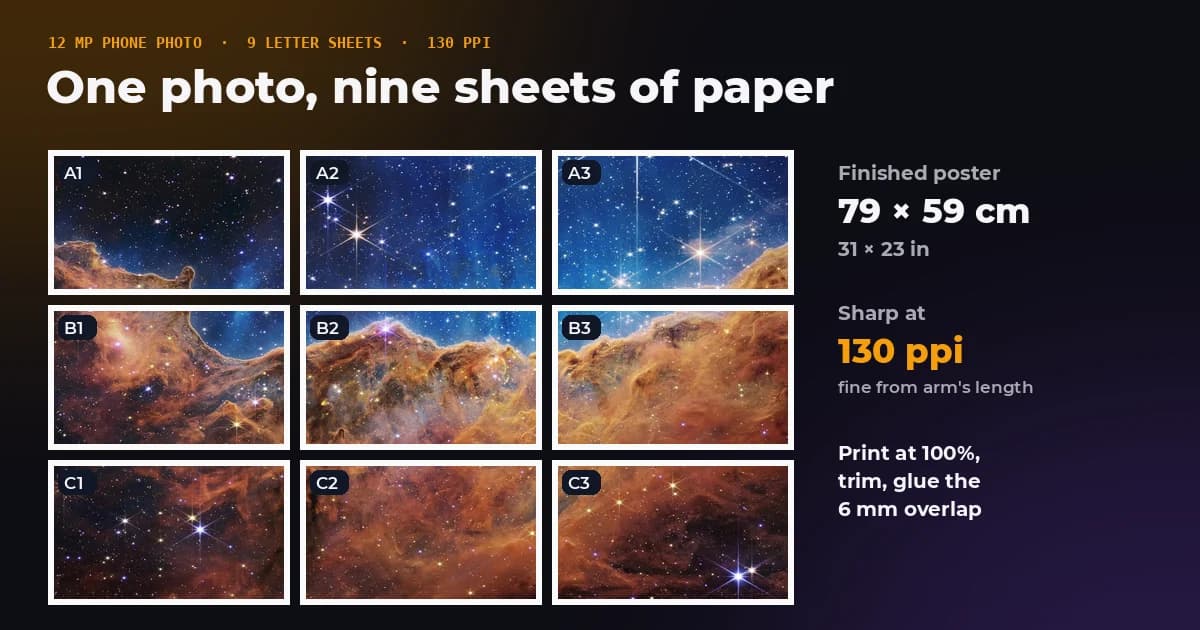
You do not need a poster printer to make a poster. Any home printer can print a big picture as a grid of ordinary sheets that you trim and join, the trick behind sites like The Rasterbator and Block Posters. The two questions are how many sheets you need, and whether your photo has enough pixels to look good that big.
We worked both out for real phone photos on A4 and Letter paper, with the margin home printers leave blank and an overlap for gluing, using the same layout maths as our image splitter. The short version: an ordinary 12 megapixel photo comfortably fills nine sheets, and it can go to sixteen if the poster hangs on a wall.
- How do I do it?
- Split the picture into page-sized tiles, print them at 100 percent, trim on the cut marks and glue the overlaps.
- How big can a phone photo go?
- About 79 × 59 cm on nine Letter sheets at 130 pixels per inch, sharp from arm's length.
- How sharp does it need to be?
- About 87 pixels per inch for a poster seen from 1 metre, a third of what a hand-held print needs.
- Why don't my pages line up?
- The printer scaled them. Print at Actual size, never Fit to page.
How much detail a poster needs
Print sharpness is measured in pixels per inch: how many of the photo's pixels land on each inch of paper. The figure you need is not fixed, it depends on how far away people stand. A person with normal vision can separate details about one sixtieth of a degree apart, one arcminute. Below that, extra pixels are invisible.
One arcminute at a distance of d inches is d × 0.000291 inches, so the pixels per inch you need come out as 3438 divided by the viewing distance in inches:
| Viewing distance | Pixels per inch needed | Typical print |
|---|---|---|
| 30 cm (12 in) | about 290 | Photo held in your hands |
| 50 cm (20 in) | about 175 | Small poster on a desk wall |
| 1 m (39 in) | about 87 | Poster on a wall |
| 1.5 m (59 in) | about 58 | Large poster across a room |
| 2 m (79 in) | about 44 | Banner |
| 3 m (118 in) | about 29 | Shop window, stage backdrop |
That is why print shops ask for 300 pixels per inch for photos and accept far less for posters. A poster on a wall that people look at from a metre or more needs only around 90.
How big a photo can print
Divide the photo's pixel width by the pixels per inch you want, and you have the widest print in inches. For common cameras:
| Photo | Sharp up close, 150 ppi | Good on a wall, 100 ppi | Seen from across a room, 60 ppi |
|---|---|---|---|
| 2 MP screenshot, 1920 × 1080 | 33 × 18 cm | 49 × 27 cm | 81 × 46 cm |
| 12 MP phone, 4032 × 3024 | 68 × 51 cm | 102 × 77 cm | 171 × 128 cm |
| 24 MP camera, 6000 × 4000 | 102 × 68 cm | 152 × 102 cm | 254 × 169 cm |
| 48 MP phone, 8064 × 6048 | 137 × 102 cm | 205 × 154 cm | 341 × 256 cm |
A phone that saves 48 megapixel photos only does so in its full resolution mode. Most phones save 12 megapixel photos by default, so check the image size in the file details before you plan a big print. Screenshots and images saved from social networks are usually 2 megapixels or less.
How many sheets you need
The tables assume a landscape 12 megapixel photo, 4032 × 3024 pixels, on sideways pages with a 6 mm margin, which most home printers can handle, and a 6 mm overlap on each joint for glue. Each row shows the pages across and down, the finished poster and how sharp it is. A 48 megapixel photo of the same scene has twice the pixels per inch at every size.
Letter paper (8.5 × 11 in)
| Pages across × down | Sheets | Finished poster | 12 MP photo | 48 MP photo |
|---|---|---|---|---|
| 2 × 2 | 4 | 52.9 × 39.7 cm (20.8 × 15.6 in) | 194 ppi | 387 ppi |
| 3 × 3 | 9 | 79.0 × 59.3 cm (31.1 × 23.3 in) | 130 ppi | 259 ppi |
| 4 × 4 | 16 | 105.2 × 78.9 cm (41.4 × 31.1 in) | 97 ppi | 195 ppi |
| 5 × 5 | 25 | 131.3 × 98.5 cm (51.7 × 38.8 in) | 78 ppi | 156 ppi |
| 6 × 6 | 36 | 157.4 × 118.1 cm (62.0 × 46.5 in) | 65 ppi | 130 ppi |
A4 paper (210 × 297 mm)
| Pages across × down | Sheets | Finished poster | 12 MP photo | 48 MP photo |
|---|---|---|---|---|
| 2 × 3 | 6 | 56.4 × 42.3 cm (22.2 × 16.7 in) | 182 ppi | 363 ppi |
| 3 × 4 | 12 | 84.3 × 63.2 cm (33.2 × 24.9 in) | 121 ppi | 243 ppi |
| 4 × 5 | 20 | 112.2 × 84.2 cm (44.2 × 33.1 in) | 91 ppi | 183 ppi |
| 5 × 6 | 30 | 140.1 × 105.1 cm (55.2 × 41.4 in) | 73 ppi | 146 ppi |
| 6 × 7 | 42 | 168.0 × 126.0 cm (66.1 × 49.6 in) | 61 ppi | 122 ppi |
A4 is narrower and taller than Letter, so on sideways pages a 4:3 photo spills a few centimetres into one more row. The 2 × 3 A4 layout prints a last row only 3.3 cm tall. In cases like that, turning the pages upright or adding a page across often uses the paper better; our splitter warns you when the last row is a thin strip.
How to print it, step by step
- Split the picture. Open it in the image splitter, choose Print a poster, your paper size and how many pages across. It shows the finished size and how sharp it will be before you print anything.
- Download the PDF. The first page is an assembly map with every sheet labelled, A1 at the top left. The rest are the tiles, each with cut marks and a dashed line where the next sheet overlaps.
- Print at 100 percent. In the print dialog choose Actual size or 100 percent. Turn off Fit to page, Shrink oversized pages and any borderless setting.
- Print one test sheet first. Measure the picture on it. If it is smaller than the poster planner said, something is still scaling the page.
- Trim and join. Cut one edge of a sheet on its cut marks, lay it over the next sheet's overlap strip and tape or glue it from behind. Join each row, then join the rows.
- Mount it. Glue the poster to card or foam board, or hang it with removable strips along the joins so it lies flat.
If the picture is already a PDF, Adobe Acrobat and Acrobat Reader can tile it too: their Poster print option has settings for tile scale, overlap, cut marks and labels.
Mistakes that ruin a tiled poster
Letting the printer scale the pages
Fit to page shrinks every sheet by a slightly different amount depending on its content and the printer's margins, so neighbouring tiles no longer meet. This is the most common reason pages do not line up.
No overlap
Paper does not feed perfectly straight, so tiles printed edge to edge almost never join without a hairline gap. Six millimetres of overlap hides small errors under the glued edge.
Enlarging a picture that is too small
Splitting a picture across more sheets makes it bigger, not more detailed. A 1920 × 1080 screenshot printed four Letter sheets wide, about 105 cm, has 46 pixels per inch and looks like a mosaic up close. If you only have a small image, choose fewer sheets or plan to hang it high.
Forgetting the printer's blank edge
Most home printers cannot print right up to the edge of the paper. Without a margin, the outer few millimetres of every tile go missing and the picture jumps at each join.
When to use a print shop instead
Tiling is free and fast, and on a wall from a metre away the joins mostly disappear. For a poster that people will look at up close, or anything with fine text across a join, a print shop printing on one large sheet gives a seamless result. Use the tables above to check your photo is big enough before you order: shops usually ask for 150 to 300 pixels per inch at the final size.
Plan your poster
The image splitter works out the sheets, the finished size and the sharpness for your own photo as you change the settings, then builds the PDF in your browser. Nothing is uploaded.
The bottom line
A home printer and a pair of scissors make a real poster. An ordinary 12 megapixel phone photo fills nine Letter sheets at 130 pixels per inch, sharp from arm's length, and sixteen sheets at 97 pixels per inch for a wall. Print at actual size, keep a small margin and overlap, and the joins all but vanish once it is on the wall.
Frequently asked questions
Sources and method
Layouts use the image splitter's own planner: printable area = paper minus a 6 mm margin on every side, each joint overlapping by 6 mm, the poster width fixed by the pages across and the height following the photo's shape. Letter is 279.4 × 215.9 mm and A4 297 × 210 mm, both used sideways. Pixels per inch = photo width in pixels ÷ poster width in inches. Viewing distance figures use a visual acuity of one arcminute, so pixels per inch = 1 ÷ (distance in inches × tan 1′) ≈ 3438 ÷ distance in inches.
- ISO 216 paper sizes, Wikipedia
- Letter paper size, Wikipedia
- Visual acuity, Wikipedia
- Adobe, print large-sized documents as posters in Acrobat
Printed across nine Letter sheets with a 6 mm margin and overlap, a 12 megapixel phone photo makes a 79 × 59 cm poster at 130 pixels per inch, and sixteen sheets give 105 × 79 cm at 97 pixels per inch, enough for a poster viewed from about 1 metre, which needs around 87. FreeImageTools, "How to Print a Large Picture on Multiple Pages", October 23, 2026, https://freeimagetools.org/blog/print-large-image-multiple-pages