How to tell if an image is AI generated in 2026
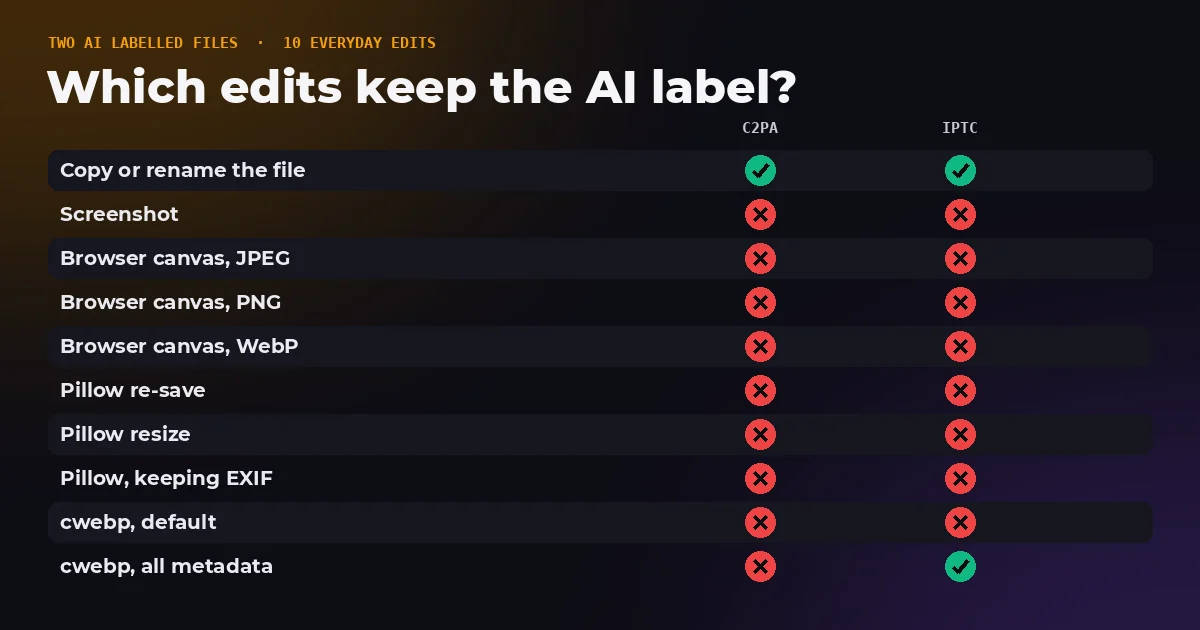
The big AI image makers now label what they produce. OpenAI, Adobe, Google and Meta all write some kind of marker into their images, and there are standards for it. So why do most AI images you find online carry no label at all? We took two AI labelled files and ran them through ten ordinary edits to find out. The label usually did not survive the first one.
- Can I tell from the file itself?
- Sometimes. If a label is still inside, a checker such as our AI Image Detector will show it. Most images online have lost theirs.
- Which AI tools label their images?
- OpenAI and Adobe Firefly use Content Credentials, Google uses SynthID watermarks plus Content Credentials on some images, and Meta uses IPTC metadata and watermarks.
- Why do so many AI images have no label?
- Everyday edits delete it. In our test, the Content Credentials survived 1 of 10 common edits, a plain copy of the file.
- What if there is no label?
- Then the file cannot tell you. Check where the image came from, run a reverse image search, and look for the visual giveaways.
The three kinds of AI label
There is no single AI tag. There are three separate systems, stored in different places, and they fail in different ways.
| Label | Where it lives | Who uses it | What removes it |
|---|---|---|---|
| Content Credentials (C2PA) | A signed manifest inside the file | OpenAI, Adobe Firefly, Google Nano Banana Pro, some cameras | Almost any re-save, and every screenshot |
| IPTC digital source type | A field in the file's XMP metadata | Meta AI, and software that follows IPTC guidance | Re-saving without keeping XMP, and every screenshot |
| Invisible watermark | Hidden in the pixels themselves | Google SynthID, Meta | Designed to survive edits, but only the maker can read it |
C2PA, the Coalition for Content Provenance and Authenticity, defines a manifest that records which tool made a file and what happened to it, signed with a certificate so changes can be detected. The IPTC field is simpler: a single value such as trainedAlgorithmicMedia, the term IPTC uses for an image created by a trained AI model, or compositeWithTrainedAlgorithmicMedia for a real image with AI edits such as generative fill. Watermarks take a different route and hide a signal in the image data, which makes them far harder to strip but impossible to check without the maker's own detector.
Who labels their AI images in 2026
- OpenAI has added C2PA metadata to images generated in ChatGPT and its API since February 2024, so that anyone can see an image came from its products.
- Adobe automatically applies Content Credentials to images made entirely with Firefly, such as Text to Image. They name Adobe as the issuer and record the AI tool used, and may be stored in Adobe's public cloud, so some files carry only a link to them.
- Google hides a SynthID watermark in images from its AI models. Since November 2025 the Gemini app can check an uploaded image for it, and images from Nano Banana Pro in the Gemini app, Vertex AI and Google Ads also carry C2PA metadata.
- Meta marks photorealistic images from Meta AI with a visible label, an invisible watermark and IPTC metadata set to trainedAlgorithmicMedia.
- Stable Diffusion interfaces such as AUTOMATIC1111 and ComfyUI are not labelling for the sake of transparency, but they save the full prompt, seed and settings into every PNG by default, which gives the image away just as clearly.
We tested what happens to the label
We made two AI labelled test files. The first carries Content Credentials signed with the C2PA project's own test certificate and declaring trainedAlgorithmicMedia, applied to a real photo that also has ordinary camera data. The second carries only the IPTC field. Then we put both through ten everyday operations and checked each result with our AI Image Detector.
| What we did to the file | C2PA label | IPTC label | What the file looked like afterwards |
|---|---|---|---|
| Copied or renamed it, bytes unchanged | Kept | Kept | AI labelled |
| Took a screenshot of it | Lost | Lost | No record at all |
| Saved it from a browser canvas as JPEG | Lost | Lost | No record at all |
| Saved it from a browser canvas as PNG | Lost | Lost | No record at all |
| Saved it from a browser canvas as WebP | Lost | Lost | No record at all |
| Re-saved it with Python's Pillow library | Lost | Lost | No record at all |
| Resized it with Pillow | Lost | Lost | No record at all |
| Re-saved with Pillow, keeping EXIF | Lost | Lost | A camera photo, or no record |
| Converted to WebP with Google's cwebp | Lost | Lost | No record at all |
| Converted with cwebp, keeping all metadata | Lost | Kept | A camera photo, or AI labelled |
The Content Credentials survived one operation out of ten, and it was the one that does not change the file. The IPTC label did a little better because a converter told to keep all metadata carried the XMP across. Every screenshot and every canvas save, which is how most web tools work, including the ones on this site, wiped everything.
Two operations kept the camera data but dropped the Content Credentials. The AI label was gone, the camera model and exposure settings were still there, and the file now looked exactly like an ordinary photo. Partial metadata can make an AI image look more trustworthy, not less.
How to check an image, step by step
- Read the file. Drop it into the AI Image Detector. It reads Content Credentials, the IPTC field, stored prompts and camera data in your browser, without uploading anything.
- Verify any credentials. If Content Credentials are found, check the signature with the Content Credentials Verify site. Our detector shows who signed them but does not validate the certificate.
- Ask Google about its own images. If the image may come from Google's AI, upload it to the Gemini app and ask whether it was made with Google AI. That checks for SynthID, which no metadata reader can see.
- Find the original. A reverse image search with Google Lens or TinEye often turns up the first place an image was posted, and whether it was described as AI there.
- Look at it properly. Zoom in on the details that generators still get wrong, listed below.
What no label means
Nothing, on its own. A missing label is the normal state of an image online, whether it came from a camera or a generator, because screenshots, messaging apps, many social networks and most editing tools remove metadata. Our detector reports such files as having no record, and that is the honest answer. It is not a verdict that the image is real.
The reverse is also true in a narrower way. Camera data proves little, because EXIF is plain text that any editor can copy from another photo. The strongest evidence a file can carry is a signed Content Credentials manifest that validates, and even that tells you what the signing software recorded, not what the scene looked like.
Visual clues that still help
- Text: signs, labels, screens and jersey numbers are often garbled, especially in the background.
- Hands and small parts: extra or merged fingers, earrings that do not match, glasses whose arms go nowhere.
- Symmetry and repetition: faces in a crowd that look alike, patterns that repeat too perfectly.
- Light: shadows pointing in different directions, reflections that do not match the scene.
- Edges and backgrounds: objects that melt into each other, hair that merges with the background.
Treat these as reasons for suspicion, not proof. Each new generation of models makes fewer of these mistakes, and a real photo can have odd reflections too. The source of an image usually tells you more than any single detail in it.
If you publish AI images
Keep the label. Some platforms require it: Google Merchant Center tells sellers that product images created with generative AI must keep the IPTC digital source type set to trainedAlgorithmicMedia, and not to remove it. Since compressing or resizing through a canvas deletes that field, upload the original file from the generator, or re-add the label with a metadata editor after editing, and check the result in the AI Image Detector before publishing.
Check an image now
The AI Image Detector reads every provenance label a file can carry and shows the evidence, in your browser, with nothing uploaded. Three sample files are built in if you want to see it work first.
The bottom line
AI labels exist and the biggest image makers use them, but they are fragile. In our test a single screenshot or re-save removed the Content Credentials nine times out of ten, and two careful conversions left an AI image looking like a camera photo. Read the file when you can, verify what you find, and when the file is silent, fall back on its source and your own eyes.
Frequently asked questions
Sources and method
Two test files were made with c2patool 0.27.22 and Python: a JPEG photo with ordinary camera EXIF, signed with the C2PA test certificate and an action declaring trainedAlgorithmicMedia, and a JPEG carrying only the IPTC DigitalSourceType field in XMP. Each was copied, screenshotted and saved through a browser canvas as JPEG, PNG and WebP in headless Chrome, re-saved and resized with Pillow 10.2, re-saved with Pillow keeping EXIF, and converted with cwebp both by default and with all metadata kept. Every output was read with the FreeImageTools AI Image Detector, whose readings matched c2patool on the C2PA project's public test files apart from one file with credentials stored online and one pre-release draft.
- OpenAI, understanding the source of what we see and hear online
- Adobe, Content Credentials overview for Firefly
- Google, how we are bringing AI image verification to the Gemini app (November 20, 2025)
- Meta, labeling AI generated images on Facebook, Instagram and Threads
- IPTC, metadata guidance for AI generated synthetic media
- C2PA technical specifications
- Google Merchant Center Help, AI generated content
- Content Credentials Verify
In a test of ten common operations on an AI labelled image, the C2PA Content Credentials survived only a plain file copy and the IPTC label survived two, while two conversions kept the camera data but dropped the AI label. FreeImageTools, "How to Tell If an Image Is AI Generated in 2026", September 27, 2026, https://freeimagetools.org/blog/is-this-image-ai-generated